Core Web Vitals are Google's way of measuring whether real users have a fast, stable, and responsive experience on your site. They have been a ranking factor since 2021, and their weight in the algorithm has grown every year since.
The March 2026 core update strengthened their role further. Sites that pass all three thresholds are seeing stronger rankings. Sites that fail are being suppressed more aggressively than before.
This article explains what each metric actually measures, what the current passing thresholds are, what changed with the INP update, and where to start if your scores need work.
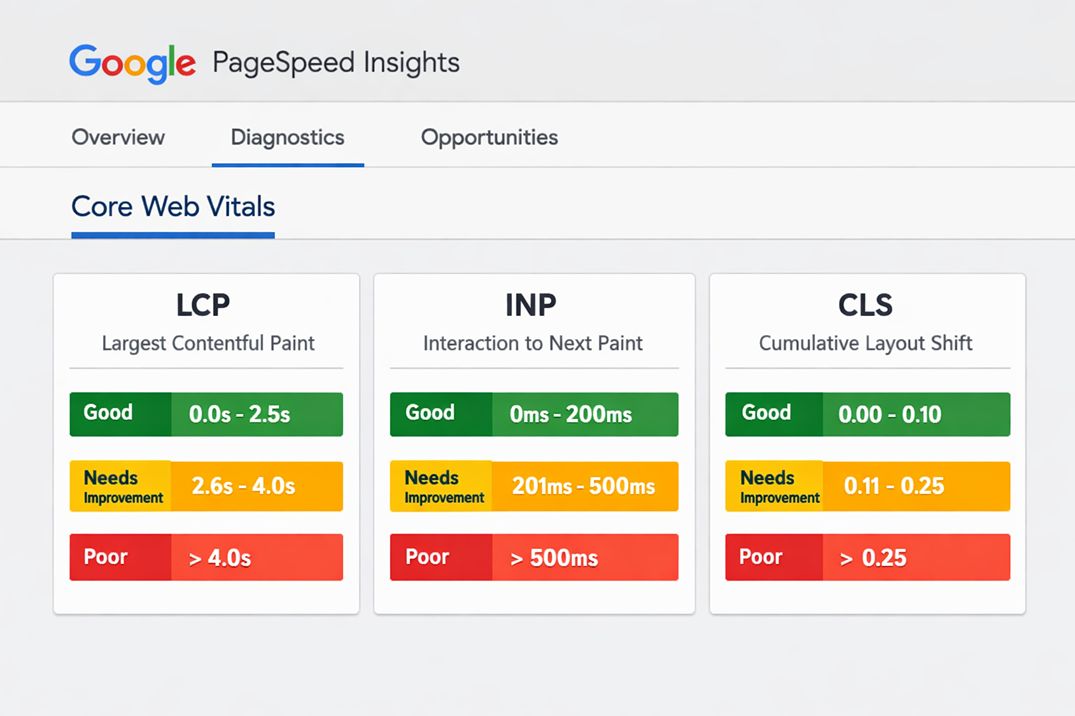
The Three Metrics That Make Up Core Web Vitals
Google evaluates each of these at the 75th percentile of real visitor data. That means 75% of your visitors need to experience a good score on each metric for your page to pass. One metric failing is enough to prevent an overall pass.
LCP: Largest Contentful Paint
LCP measures how long it takes for the largest visible element on the page to fully load. This is usually a hero image, a large heading, or a video thumbnail.
It represents the moment a visitor perceives your page as having loaded. If LCP is slow, the visitor is staring at a blank or partial page while the main content is still loading.
The thresholds are:
- Good: under 2.5 seconds
- Needs improvement: 2.5 to 4.0 seconds
- Poor: over 4.0 seconds
Research shows pages loading within 2 seconds have a 9% bounce rate. Pages taking over 5 seconds see bounce rates jump to 38%. Every second of delay beyond the 2.5-second threshold increases bounce rate by roughly 32%.
The most common causes of slow LCP are large uncompressed images, render-blocking JavaScript or CSS, no content delivery network (CDN), and slow server response times. If your server takes more than 600 milliseconds to send the initial HTML, you are already burning through half your LCP budget before the browser has even started loading anything else.
INP: Interaction to Next Paint
INP is the newest of the three metrics and, in 2026, the hardest to pass. It replaced First Input Delay (FID) in March 2024.
FID only measured the delay before the browser responded to a user's first interaction. It did not measure how long that interaction actually took to complete. A site could pass FID while still feeling sluggish to every visitor after the initial click.
INP measures every click, tap, and keypress throughout the entire visit. It takes the worst interaction at the 98th percentile and uses that as the score. A page with good INP feels consistently fast and responsive, not just on the first tap.
The thresholds are:
- Good: under 200 milliseconds
- Needs improvement: 200 to 500 milliseconds
- Poor: over 500 milliseconds
As of 2026, 43% of sites fail the 200ms threshold, making INP the most commonly failed Core Web Vital. The reason it is so difficult to fix is that poor INP is almost always caused by heavy JavaScript blocking the browser's main thread. You cannot solve it by compressing images or enabling caching. It requires rethinking how your code handles user events.
CLS: Cumulative Layout Shift
CLS measures how much the content on your page moves around unexpectedly while it loads. It captures that frustrating moment when you are about to tap a link and an image loads above it, pushing everything down so you tap the wrong thing.
Unlike LCP and INP, CLS is not a time measurement. It is a score calculated from the size of the shifting content and the distance it moves. A score of 0 means nothing moved. Higher scores mean more instability.
The thresholds are:
- Good: under 0.1
- Needs improvement: 0.1 to 0.25
- Poor: over 0.25
The most common causes of high CLS are images and videos with no defined width and height attributes, ads or embeds that load late and push content, and web fonts that cause text to reflow when they finish loading.
What Changed in 2026: The Role Core Web Vitals Play Now
For most of their history, Core Web Vitals operated as a tiebreaker. If two pages had similar content quality, the one with better scores would edge ahead. That framing has shifted.
Data from Mewa Studio, citing DebugBear research, shows that pages in position 1 on Google have a 10% higher Core Web Vitals pass rate than pages in position 9. Only 47% of sites currently reach the good threshold across all three metrics. The remaining 53% are leaving meaningful ranking potential on the table.
After the March 2026 core update, the pattern is clearer: poor Core Web Vitals are increasingly acting as a filter rather than just a tiebreaker. Sites with metrics in the red can be suppressed even when their content is strong.
That said, the fundamental hierarchy has not changed. Content quality, relevance, and authority remain the primary signals. Core Web Vitals cannot rescue thin content. But they can prevent strong content from reaching its full ranking potential.
If you have not yet had a technical review of your site, a technical SEO audit will surface your Core Web Vitals failures alongside other site health issues in one prioritized action plan, which makes it much easier to know what to fix first.
Lab Data versus Field Data: Which One Matters for Rankings
This distinction causes more confusion than almost anything else in this topic.
Lab data comes from a simulated test in a controlled environment. Tools like Google Lighthouse and PageSpeed Insights generate lab data. These tools are useful for finding problems, but they simulate a fixed device and connection speed. Your real visitors are on different devices, different networks, and in different locations.
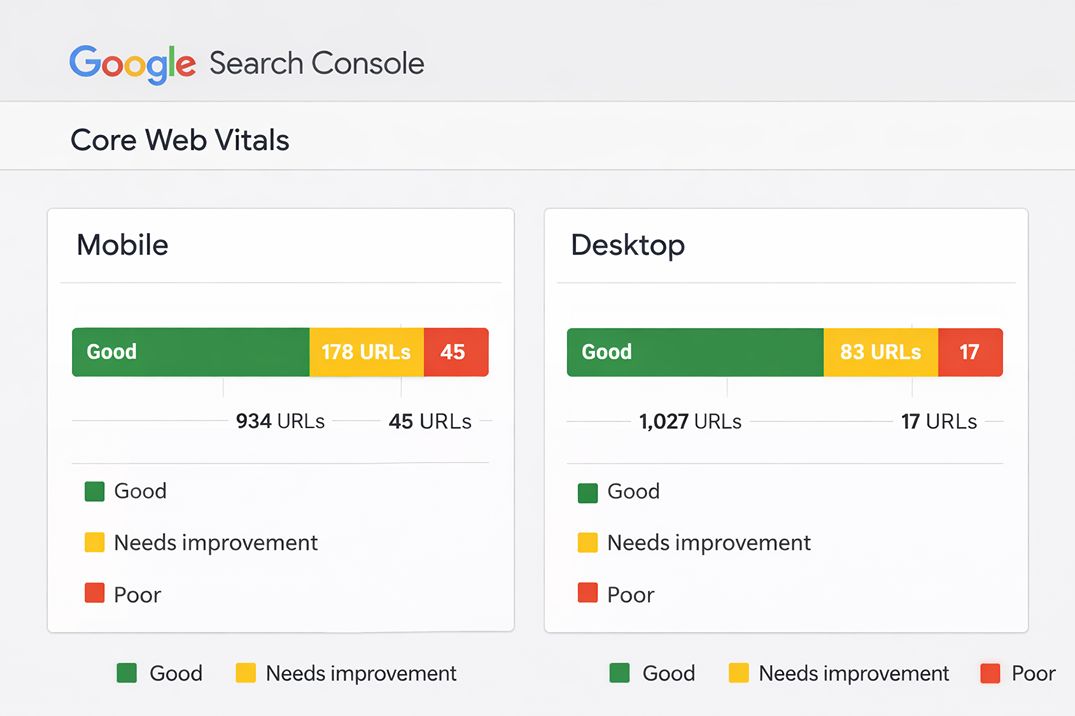
Field data is what Google actually uses for rankings. It comes from real Chrome users visiting your site, collected through the Chrome User Experience Report (CrUX). This is the data shown in Google Search Console's Core Web Vitals report.
The practical implication is this: you can run Lighthouse and score 95 on performance. But if your real visitors on mid-range Android phones on a 4G connection are seeing a 4-second LCP, that is what Google is measuring.
Always check your field data in Search Console first. Use Lighthouse and PageSpeed Insights to diagnose what is causing the problem, not to evaluate whether you have passed.
Why Mobile Performance Is the Priority
Google uses mobile-first indexing. This means the mobile version of your site is what Google primarily crawls, indexes, and uses to determine rankings, including for desktop search results.
Over 60% of Google searches in 2026 happen on mobile. And mobile users are on slower networks and less powerful devices than desktop users. This means your Core Web Vitals scores are almost always worse on mobile than on desktop.
The practical consequence is straightforward: fix mobile performance first. A site that is fast on desktop but slow on mobile is still slow as far as Google is concerned.
53% of mobile visitors abandon a site that takes more than 3 seconds to load. That is not a ranking problem at that point. It is a business problem.
What to Fix First: A Prioritized Approach
Core Web Vitals failures have different causes depending on which metric is failing. Treating all three as the same kind of problem wastes time.
If LCP is failing
Start with your hero image or whatever element Google identifies as the LCP element. Common fixes include:
- Convert images to modern formats like WebP or AVIF
- Add a preload tag for the LCP image so the browser discovers it earlier
- Do not lazy-load the LCP image. Around 16% of sites make this mistake and it significantly delays LCP
- Use a CDN to reduce server response time for visitors who are geographically distant from your server
- If your server takes over 600ms to respond, consider upgrading your hosting plan before doing anything else
If INP is failing
INP failures are almost always a JavaScript problem. The main thread is being blocked by long tasks, which prevents the browser from responding to user input quickly. Common fixes include:
- Break up any JavaScript task running longer than 50 milliseconds into smaller chunks
- Defer non-critical scripts such as analytics, chat widgets, and tag managers so they do not compete with user interactions
- Audit third-party scripts. Each one adds execution time to the main thread. Remove anything that does not directly serve users
- Optimize event handlers. Debounce or throttle frequent events like scroll and resize
INP is the metric that most often requires developer involvement. If you are running a WordPress site, reviewing your plugins is the starting point. Every active plugin adds JavaScript. Unused plugins running in the background are a common source of INP failures.
If CLS is failing
CLS is usually the most straightforward to fix. The most impactful changes are:
- Add explicit width and height attributes to every image and video element on the page
- Reserve space for ads and embeds before they load so they do not push content when they appear
- Use font-display: swap in your CSS to prevent text from becoming invisible while custom fonts load
- Avoid injecting content above existing visible content after the page has started rendering
The Tools to Use for Measurement
Using the right tool for the right purpose saves significant time when diagnosing Core Web Vitals issues.
Google Search Console is where you start. The Core Web Vitals report shows field data broken down by mobile and desktop, with a URL-level view of which pages are passing and which are failing. This is the ground truth for your rankings.
PageSpeed Insights shows both field data (when available) and lab data for a specific URL. Use it to get a quick reading on a single page and to see Google's specific recommendations for that page.
Chrome DevTools and Lighthouse are for deep diagnosis. Use them to identify the specific elements causing LCP delays, the JavaScript tasks causing INP failures, and the layout shifts driving your CLS score.
Understanding how Core Web Vitals interact with your on-page content is covered in more detail in the article on search intent and on-page SEO, which explains how page structure and content quality work alongside technical signals to determine rankings.
Core Web Vitals and the Technical SEO Audit Connection
Core Web Vitals do not exist in isolation. They are one component of a broader technical health picture that includes crawlability, indexing, structured data, mobile usability, and HTTPS status.
A site can pass all three Core Web Vitals thresholds and still have significant technical problems that suppress rankings. Broken internal links, crawl budget waste, duplicate content, and missing canonical tags all affect how Google evaluates and ranks your pages.
This is why addressing Core Web Vitals as part of a structured technical SEO service tends to produce better results than fixing them in isolation. When you understand the full technical picture, you fix the right things in the right order.
Frequently Asked Questions
Are Core Web Vitals a direct Google ranking factor?
Yes. Google confirmed Core Web Vitals as part of its Page Experience ranking signals. They function as a tiebreaker in competitive searches where content quality is similar, and after the March 2026 core update, pages with poor scores face stronger suppression than before.
What are the passing thresholds for Core Web Vitals in 2026?
Good scores are: LCP under 2.5 seconds, INP under 200 milliseconds, and CLS under 0.1. All three must pass at the 75th percentile of real user data, meaning 75% of your visitors need to experience a good score on each metric for your page to pass.
What replaced First Input Delay?
Interaction to Next Paint (INP) replaced FID in March 2024 and is now fully embedded as a ranking signal. FID only measured the delay before the browser responded to the first interaction. INP measures the full response time across all interactions throughout the entire visit, making it a much stricter and more accurate measure of how responsive a site feels.
Does Google use lab data or real user data for rankings?
Google uses field data, which is real user data collected through Chrome browsers and stored in the Chrome User Experience Report (CrUX). Lab data from tools like Lighthouse or PageSpeed Insights is useful for diagnosing problems but is not what Google uses for ranking decisions.
Why is INP the hardest Core Web Vital to fix?
INP failures are almost always caused by JavaScript blocking the browser's main thread. Unlike LCP, which you can improve by compressing images or using a CDN, fixing INP often requires rethinking how your code handles user events. As of 2026, 43% of sites fail the 200ms INP threshold, making it the most commonly failed Core Web Vital.
How long does it take to see ranking improvements after fixing Core Web Vitals?
Google's Search Console uses a 28-day rolling window of field data, so metric improvements typically become visible within 4 to 8 weeks. Ranking changes may take 1 to 3 months, as they depend on many factors beyond Core Web Vitals alone.
Can good Core Web Vitals compensate for weak content?
No. Google is clear that content quality, relevance, and E-E-A-T remain the primary ranking signals. Core Web Vitals cannot rescue thin content or a site with poor authority. They improve your ceiling when content is strong, but they cannot substitute for it.
Want to know how your site scores on Core Web Vitals?
A technical SEO audit covers Core Web Vitals, crawlability, structured data, and all other factors that affect how Google evaluates your site.
Get an SEO AuditWritten by
Illan Lebumfacil
SEO Freelancer at Search Engine Hub, based in Talisay, Cebu. Helping businesses in the Philippines and internationally improve their search visibility through precise, data-driven strategies.
About me →