An SEO audit report lands in your inbox and suddenly you are staring at a document full of red flags, scores out of 100, and terms like "crawl budget," "canonical errors," and "toxic backlinks." Most business owners either ignore the whole thing or try to fix every item on the list without knowing which ones actually matter.
Neither approach works. This guide explains what each section of an SEO audit report actually means, how to tell a critical issue from a low-priority one, and how to turn the findings into a clear action plan.
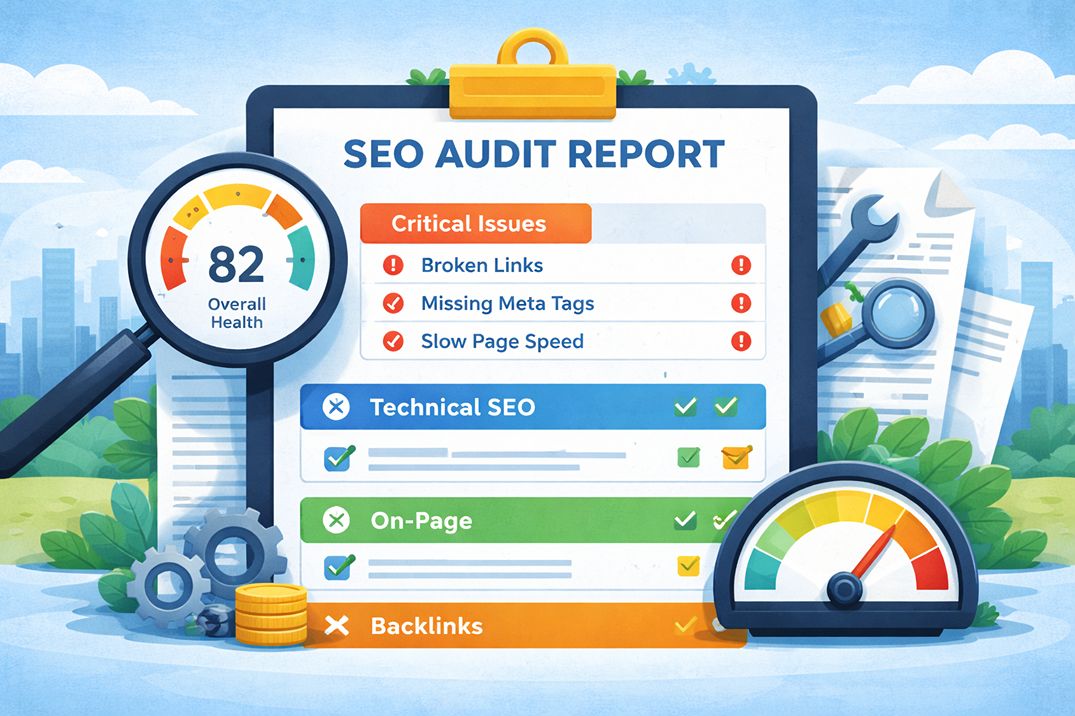
What an SEO Audit Report Is Actually Measuring
Before reading a single line of the report, it helps to understand what an SEO audit is designed to answer. At its core, it is asking three questions about your website:
- Can Google find and access your pages?
- Does what is on those pages match what your target audience is searching for?
- Does the wider web signal that your site is trustworthy and authoritative?
Every section of the report maps back to one of these three questions. When you read a finding, ask yourself which question it relates to. That tells you how seriously to take it.
One important note before going further: Google's own guidance warns against relying on tool-generated audit scores as if every flagged item carries equal weight. Martin Splitt from Google's Search Relations team has stated that a technical audit needs expertise to adapt checklists to the specific site being audited, not a one-size-fits-all approach. Many audit tools flag things that are completely normal behavior for a given site. Context matters.
The Executive Summary: Start Here, Not at Page One
Most audit reports open with a summary section showing an overall health score, a traffic snapshot, and a short list of the most critical findings. This is the right place to start reading.
The overall score, whether it is expressed as a number out of 100 or a letter grade, is a relative indicator rather than an absolute judgment. A score of 70 in a competitive niche might reflect a well-optimized site. A score of 85 on a site with fundamental content problems means very little.
What matters in the summary section:
- The number of critical errors, not the total issue count
- Any issues flagged as blocking crawling or indexing
- Organic traffic trend over the past 6 to 12 months
- Whether a Google manual action or penalty is mentioned
A manual action means Google has applied a human-reviewed penalty to your site. This is the highest severity finding in any audit and needs to be addressed before anything else.
Section 1: Technical SEO and Crawlability
This section answers the first question: can Google find and access your pages?
The technical section is where most business owners' eyes glaze over. The terminology is dense. But the underlying concepts are simpler than they appear.
Crawl errors
When Googlebot visits a URL on your site and cannot access it, that is a crawl error. The most common types are 4xx errors, meaning the page does not exist, and 5xx errors, meaning the server failed to respond.
A 404 on a page you have intentionally removed is not a problem. A 404 on a page you want ranked is a serious issue that needs fixing immediately. The report should list the specific URLs affected so you can check them directly.
Indexing status
Indexing tells you which pages Google has added to its database. Only indexed pages can appear in search results.
The report will show pages that are excluded from the index and the reason for each exclusion. Common reasons include a noindex tag on the page, the URL being blocked in the robots.txt file, thin or duplicate content, or the page being redirected.
Not every excluded page is a problem. Login pages, thank-you pages, and internal search result pages are often intentionally excluded. The concern is when pages you want to rank are being excluded without a deliberate reason.
Redirect issues
Redirects tell Google that a URL has moved. A single redirect from an old URL to a new one is normal and carries minimal cost. A redirect chain, where URL A redirects to URL B which redirects to URL C, wastes crawl resources and dilutes link equity. Every unnecessary step in a chain should be removed so redirects point directly to the final destination.
XML sitemap and robots.txt
Your sitemap is the list of pages you want Google to prioritize. Your robots.txt file tells Google which parts of the site it is allowed to crawl.
Common problems flagged here include a sitemap listing pages that return errors, a sitemap not submitted to Google Search Console, or a robots.txt rule accidentally blocking important pages. The latter is one of the most damaging mistakes a site can have and is unfortunately common after website migrations and redesigns.
Section 2: On-Page SEO Findings
This section covers the elements on individual pages that tell Google what each page is about and whether it deserves to rank.
Title tags
The title tag is the headline that appears in search results. Every page should have a unique title tag that accurately describes the page content and includes the primary keyword the page is targeting.
The audit will flag missing title tags, duplicate title tags across multiple pages, and title tags that are too long or too short. Missing and duplicate title tags on important pages are medium to high priority fixes. Length warnings are generally low priority unless the title is being truncated in a way that removes the important information.
Meta descriptions
The meta description is the short paragraph that appears below your title tag in search results. It does not directly affect ranking, but it directly affects click-through rate.
A well-written meta description tells the searcher exactly what they will find on the page and gives them a reason to click. Duplicate or missing meta descriptions across important pages are worth fixing, especially on pages that already rank but are not getting the clicks their position should generate.
Heading structure
Every page should have a single H1 heading that matches the topic and intent of the page. Subheadings using H2 and H3 tags help both readers and search engines understand the structure of the content.
The report will flag pages with no H1, multiple H1 tags, or heading structures that skip levels. A missing H1 on an important page is worth fixing. Multiple H1s are usually a template-level issue that can be resolved once and applied across many pages.
Thin and duplicate content
Thin content refers to pages that offer very little value to visitors: pages with minimal text, auto-generated content, or pages that simply repeat what is already covered better elsewhere on your site.
Duplicate content refers to pages where the same or very similar content appears at multiple URLs. This is common on e-commerce sites with product variants, sites that have both HTTP and HTTPS versions accessible, or sites with URL parameters that generate near-identical pages.
Both issues weaken the overall authority of your site. The typical fix is to consolidate duplicate pages using canonical tags or 301 redirects, and to either improve thin pages or remove them from the index.
Section 3: Core Web Vitals and Page Speed
This section covers how fast your pages load, how stable they are visually, and how quickly they respond to user interactions. These are measured through three metrics: Largest Contentful Paint (LCP), Interaction to Next Paint (INP), and Cumulative Layout Shift (CLS).
What matters here is field data, meaning real user experience data from Chrome, not the lab score from a simulated test. Google uses field data for rankings. A high Lighthouse score does not mean your Core Web Vitals are passing if your real visitors on mobile devices are experiencing slow load times.
If your audit shows Core Web Vitals failures, the detail on what each metric means and how to fix each one is covered in the article on Core Web Vitals in 2026, which goes through LCP, INP, and CLS with specific fixes for each.
For the purposes of reading your audit report, treat any page speed section finding marked as poor or failing as a medium to high priority item, depending on how much traffic that page receives and how competitive your market is.
Section 4: Backlink Profile
The backlink section shows who is linking to your site, the quality of those links, and how your profile compares to competitors ranking above you.
Key things to look for in this section:
Domain authority or domain rating
This is a third-party score, not a Google metric, that estimates the overall strength of your site's backlink profile on a scale from 0 to 100. It is useful as a relative benchmark against competitors, not as an absolute measure of your SEO health. A site with a domain authority of 25 can absolutely outrank a site with a domain authority of 50 if the lower-authority site has better content and on-page optimization.
Toxic or spammy backlinks
Most sites accumulate some low-quality links over time without any deliberate action. A small number of toxic links rarely causes problems on its own.
The concern is a high concentration of spammy links, especially if they appear to have been built deliberately through link schemes. If your audit flags this, and you have seen a traffic drop that coincides with a Google update, it is worth investigating further. The standard response is to disavow problematic links through Google Search Console.
Competitor link gap
This section compares the sites linking to your competitors but not to you. These are link building opportunities that a competitor has identified and secured that you have not. The list is a starting point for outreach, not a guaranteed ranking fix.
How to Prioritize What Gets Fixed First
The most common mistake after receiving an audit is treating every flagged issue as equally urgent. A report listing 200 issues does not mean your site has 200 serious problems. Many flagged items are minor or reflect normal site behavior.
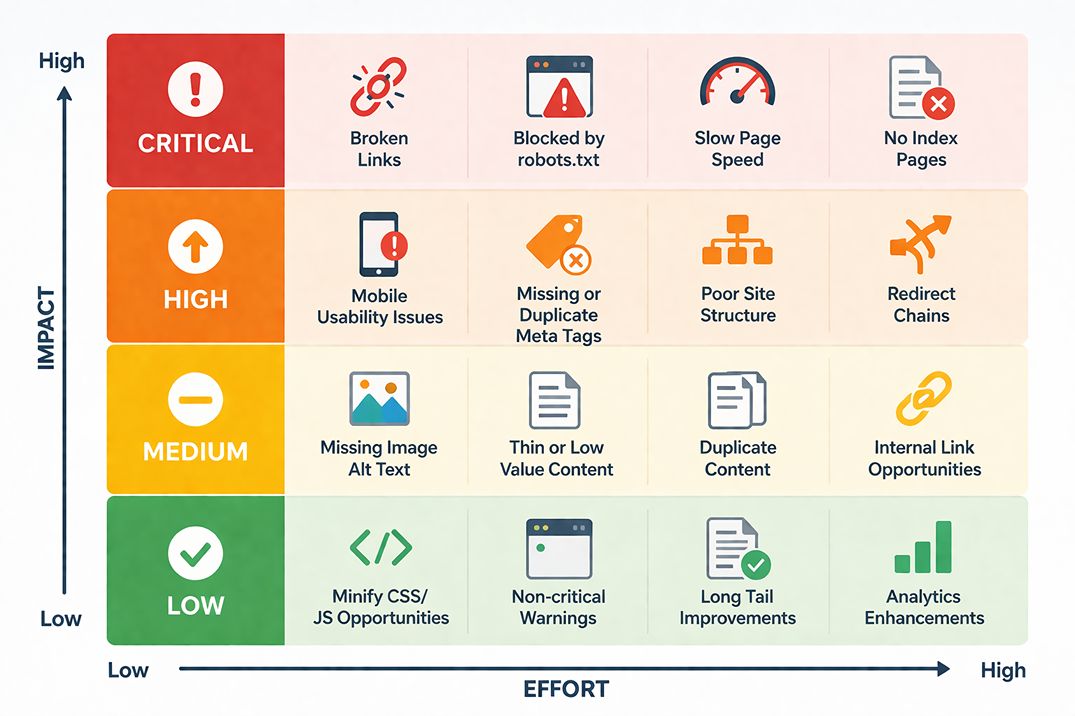
A practical framework for prioritizing audit findings uses three buckets:
Bucket 1: Fix immediately
These are issues actively preventing Google from crawling or indexing your site, or causing a manual penalty. They include:
- Google manual actions or penalties
- Pages you want ranked returning 404 or 5xx errors
- Noindex tags or robots.txt rules blocking important pages
- Site not accessible over HTTPS
- Sitemap not submitted to Google Search Console
Bucket 2: Fix in the next 30 to 60 days
These issues affect rankings and user experience but are not causing an immediate site-level emergency. They include:
- Core Web Vitals failures on high-traffic pages
- Missing or duplicate title tags on important pages
- Redirect chains with more than two steps
- Significant duplicate content across key pages
- Mobile usability errors flagged in Google Search Console
Bucket 3: Address when time allows
These are valid issues but their impact is low. They improve your site over time but are not holding back your rankings right now. They include:
- Missing alt text on decorative images
- Meta description length warnings on low-traffic pages
- Minor heading structure inconsistencies
- Low word count flags on pages with intentionally brief content
The Numbers That Actually Matter
SEO audit reports are full of numbers. Most of them are not worth spending significant time on. These are the ones that are worth tracking:
Indexed pages vs. total pages. If Google has indexed significantly fewer pages than your site has, there is likely a crawl or content quality issue worth investigating. The gap between the two numbers is the starting point.
Core Web Vitals pass rate. The percentage of your URLs passing all three Core Web Vitals thresholds. Only 47% of sites pass all three in 2026. If your rate is below that, it is a genuine competitive disadvantage.
Organic click trend. Whether organic clicks from Google are going up, down, or flat over the past six months. This is the clearest signal of whether your current SEO is working. A declining click trend after an algorithm update is the most important data point in the entire report.
Pages with zero organic clicks. Pages that are indexed but receiving no organic traffic. These may be targeting keywords with no search volume, competing internally with stronger pages on your own site, or simply not ranking for anything meaningful. This list often reveals content that should be updated, merged, or removed.
Understanding how the keyword choices you made when creating those pages affect their performance connects directly to the article on long-tail keywords for local businesses, which covers how to identify what your audience is actually searching for before creating content.
What to Do After Reading the Report
An audit report without an action plan is just a list of problems. The value comes from what happens next.
The most effective approach is to take the Bucket 1 and Bucket 2 items and assign each one a specific owner, a completion date, and a one-line explanation of why it matters in plain language. Technical teams are more likely to prioritize fixes when they understand the business reason, not just the SEO reason.
For example: "Fix the noindex tag on the services page" with a note that says "This page is currently invisible to Google and receiving zero organic traffic" is more likely to get actioned than a raw audit export with 200 rows in a spreadsheet.
A re-audit in 90 days is the standard interval for most sites. If major site changes have been made, a re-audit within 48 hours is worth running to catch any technical issues introduced during the update. Site migrations are particularly prone to introducing crawlability problems that go unnoticed until rankings drop.
If you want a structured audit that covers technical health, local search signals, Core Web Vitals, and on-page factors with a prioritized action plan you can follow immediately, the SEO audit service at Search Engine Hub delivers exactly that.
Frequently Asked Questions
What is an SEO audit report?
An SEO audit report is a structured analysis of your website that identifies issues preventing Google from crawling, indexing, or ranking your pages effectively. It covers technical health, on-page content factors, backlink quality, and performance signals like Core Web Vitals. A good report does not just list problems — it prioritizes them by impact so you know what to address first.
Should I fix every issue listed in an SEO audit?
No. SEO audit tools surface hundreds of findings, many of which have little or no effect on rankings. Google's own guidance warns against treating tool-generated issue lists as equally important. Focus on issues that affect crawlability, indexing, Core Web Vitals, and on-page fundamentals. Low-priority items can be addressed later or ignored entirely.
What is a crawl error and why does it matter?
A crawl error occurs when Googlebot visits a URL on your site and cannot access it, usually because the page returns a 4xx or 5xx HTTP status code. 404 means the page does not exist. 5xx means the server failed to respond. If critical pages return these errors, Google cannot index them. If the errors are on pages you no longer need, they should return a 404 or be redirected. If they are on pages you want ranked, the issue needs immediate fixing.
What does indexing status mean in an audit report?
Indexing status tells you which of your pages Google has added to its database and which it has not. Pages not in the index cannot appear in search results. An audit report will flag pages blocked by a noindex tag, disallowed in robots.txt, or excluded because of thin content or duplicate content issues. Not every excluded page is a problem. The concern is when pages you want ranked are being excluded.
What is a toxic backlink and should I be worried about it?
A toxic backlink is a link to your site from a source Google considers low-quality or manipulative. Most sites accumulate some naturally without any deliberate action. A small number rarely causes problems on its own. The concern is a high concentration, particularly if they were built deliberately. A Google manual action for unnatural links is the most serious outcome. Disavowing toxic links through Google Search Console is the standard response when there is genuine penalty risk.
How often should an SEO audit be done?
A comprehensive audit should be run every three months for most sites. Additional audits should be triggered immediately after a major site change such as a redesign or CMS migration, and after any significant Google algorithm update that causes noticeable traffic movement. High-traffic e-commerce sites benefit from monthly technical audits focused on crawlability and Core Web Vitals.
What is the difference between a technical audit and a content audit?
A technical audit evaluates your site's infrastructure: crawlability, indexing, site speed, Core Web Vitals, mobile usability, structured data, and HTTPS. A content audit evaluates the quality, relevance, and coverage of your pages: whether content matches search intent, whether pages are thin or duplicate, and whether your site covers the topics your audience is searching for. A complete SEO audit covers both.
Want an audit that tells you exactly what to fix and in what order?
The SEO audit at Search Engine Hub covers technical health, on-page factors, local signals, and Core Web Vitals — with every finding prioritized by impact so your team knows where to start.
Get an SEO AuditWritten by
Illan Lebumfacil
SEO Freelancer at Search Engine Hub, based in Talisay, Cebu. Helping businesses in the Philippines and internationally improve their search visibility through precise, data-driven strategies.
About me →